 Website inspiration boards
Pageboard
Collect website references, sort them with tags and arrange them on a moodboard.
Pageboard is a private, local-first home for the website designs you want to remember. Add your own screenshots and source links, sort references by section, platform, tags and favorites, and arrange the best ones on a spatial moodboard. Export an editable project, a standalone HTML sheet or a moodboard PNG, and keep a separate accessibility review of the pages you build.

Screenshots
- The board: references with screenshots, sections, tags and favorites
 The moodboard: arrange references, notes and colors freely
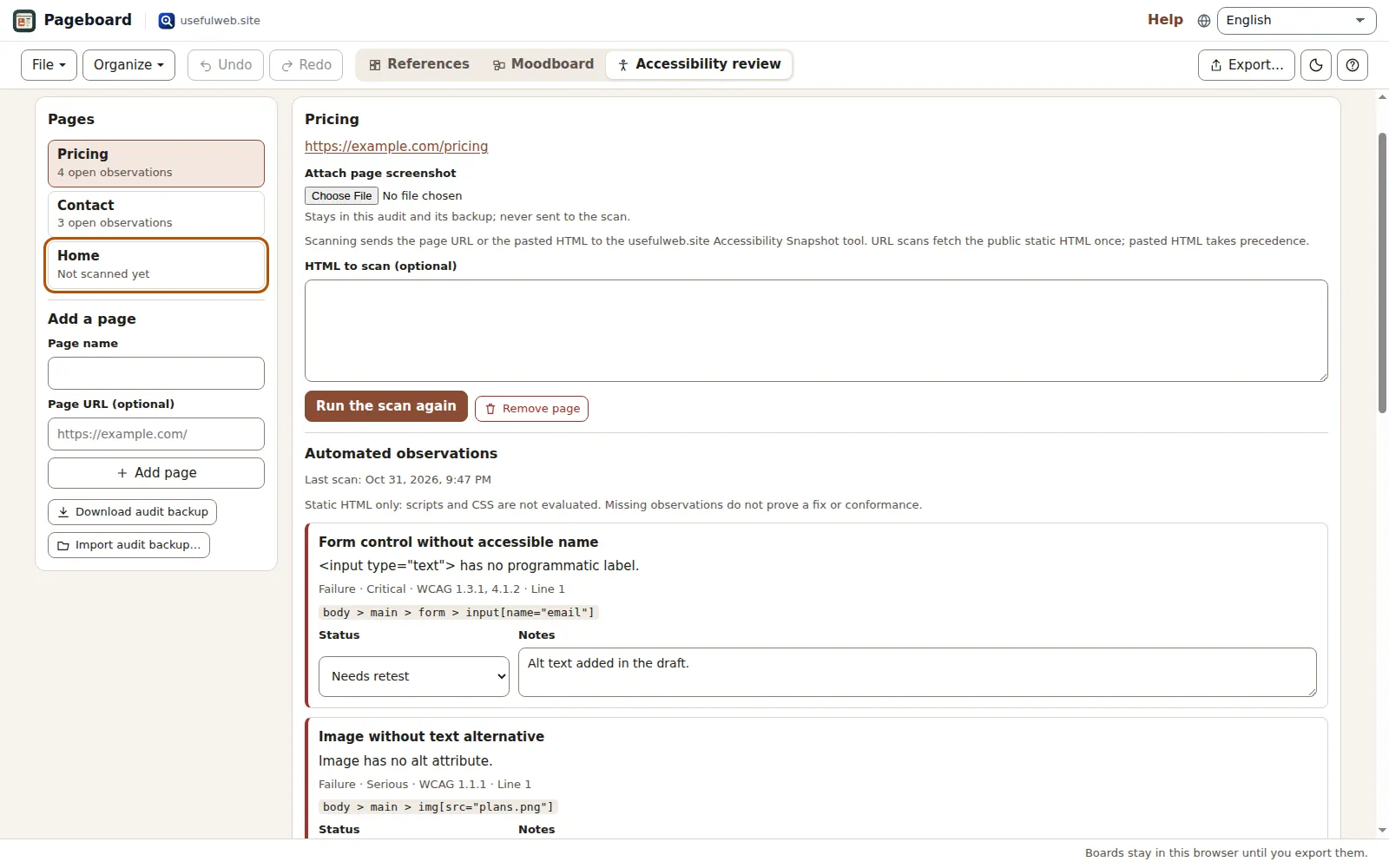 Accessibility review: automated observations and manual checks per page
Features
Boards for every project
Keep separate boards for client work, a redesign or a new direction. Every board autosaves in this browser and appears under Saved boards.
Your own screenshots
Upload, paste or drop a PNG, JPEG or WebP screenshot. Pageboard resizes it for storage and never fetches websites or captures pages for you.
Sections, platforms and tags
Record the source link, the page section, the platform, up to eight tags, notes and an accent color for each reference.
Search and filters
Search titles, links, tags and notes, then narrow the board by section, platform, tag or favorites.
Bulk tagging
Add or remove one tag on all filtered references in a single step that one Undo reverts.
Duplicate link finder
Find references that point to the same source address. The check runs locally and never loads the sites.
Spatial moodboard
Arrange reference cards, notes, color swatches and images on a free canvas with zoom, snapping, stacking order and full keyboard control.
JSON, HTML and PNG exports
Download the editable project, a standalone read-only HTML sheet, only the filtered selection, or a PNG of the moodboard.
Accessibility review
Track automated observations from the Accessibility Snapshot tool and your own manual checks for several pages, including retests.
Local-first and portable
Undo and redo, project files, share links, App Bridge handovers and optional Google Drive saving for signed-in visitors.
Tools for agents
Plan a board from a list, inspect a project or organize its tags through the same tool forms, JSON API and MCP.


Templates
Start from a ready-made project and change it to fit.
A small collection
Four fictional prompts with tags, notes and a first moodboard to show how the board works.
Portfolio refresh
Plan a personal portfolio: hero ideas, project pages, about page and contact details.
Shop launch
Collect product page, checkout and trust references for a small online shop.
Event page
Ideas for a festival or conference page: schedule, speakers, tickets and venue.
Editorial notes
Typography and reading experience references for a magazine or blog.
Built-in tools
Pageboard uses these tools. Each one also has its own page and works on its own, in the browser, through the JSON API and through MCP.
- Reference Board Planner Pageboard engineTurn a list of website references into an editable board.
- Reference Board Inspector Pageboard engineInspect your references and make a portable visual board.
- Reference Tag Organizer Pageboard engineClean up and apply tags across a reference board.
- Accessibility SnapshotStatic WCAG 2.2 snapshot of a page: findings by severity, evidence and manual checks.
For AI agents
Pageboard runs on a deterministic engine. The same functions are available as tools with a JSON API and MCP, so scripts and AI agents get exactly the results the app shows.
- Reference Board Planner – Turn a list of website references into an editable board.
Tool page ·POST https://pageboard.usefulweb.site/api/v1/tools/pageboard-reference-planner/calculate· MCPpageboard_reference_planner - Reference Board Inspector – Inspect your references and make a portable visual board.
Tool page ·POST https://pageboard.usefulweb.site/api/v1/tools/pageboard-board-inspector/calculate· MCPpageboard_board_inspector - Reference Tag Organizer – Clean up and apply tags across a reference board.
Tool page ·POST https://pageboard.usefulweb.site/api/v1/tools/pageboard-tag-organizer/calculate· MCPpageboard_tag_organizer - Accessibility Snapshot – Static WCAG 2.2 snapshot of a page: findings by severity, evidence and manual checks.
Tool page ·POST https://pageboard.usefulweb.site/api/v1/tools/a11y-snapshot/calculate· MCPa11y_snapshot
- MCP endpoint (Streamable HTTP):
https://pageboard.usefulweb.site/mcp - Project file format (JSON Schema): https://pageboard.usefulweb.site/project.schema.json
- OpenAPI description: /openapi.json · llms.txt · API & MCP
Build a project through the API, then open it in the app with a link to https://pageboard.usefulweb.site/app#project=<base64url JSON>.
Import & export
Import
- Pageboard project (.pageboard.json)
- PNG / JPEG / WebP screenshots (upload, paste or drop)
- Accessibility audit backup (JSON)
Export
- Pageboard project (.pageboard.json)
- Standalone HTML reference sheet
- Filtered selection (JSON or HTML)
- Moodboard PNG
- Accessibility audit backup (JSON)
Keyboard shortcuts
| Keys | Action |
|---|---|
| Ctrl + S | Download the board as a project file |
| Ctrl + O | Open a project file |
| Ctrl + Z | Undo the latest edit |
| Ctrl + Shift + Z | Redo an edit |
| N | Add a reference (single-key shortcuts can be switched off in Help) |
| / | Search references |
| ? | Open help and keyboard shortcuts |
| Arrow keys | Move the focused moodboard card (Shift for larger steps) |
| Delete | Remove the focused moodboard card |
Frequently asked questions
Does Pageboard download screenshots of websites?
No. You add your own screenshots and links. Boards never load the referenced sites. Only the accessibility review sends a page URL or pasted HTML to the Accessibility Snapshot tool, and only when you start a scan.
Where are my boards stored?
In this browser on this device (IndexedDB). Download a project file for a backup or to move a board to another device; signed-in visitors with Google Drive connected can also save to Drive.
Can I share a board?
Yes. Export a standalone HTML sheet for people who only need to look at it, or share the editable project file. To share only part of a board, filter it first and export the selection.
Are the template boards real websites?
No. Templates contain original fictional prompts without screenshots or links, written to show how sections, tags and the moodboard work. Replace them with your own references.
May I store screenshots of other websites?
Pageboard keeps the images you add on your device. Whether you may keep or share a screenshot depends on its rights holder; exports contain the images, so share them only where you are allowed to.
Is the accessibility review a conformance test?
No. The scan checks static HTML for common problems; scripts and CSS are not evaluated. Keyboard, focus, screen-reader and contrast checks need a person, which is why the review tracks them separately.
Limitations
What Pageboard does not do (yet):
- Pageboard does not crawl galleries, fetch pages or capture screenshots; you add every image yourself.
- Screenshots are stored as compressed JPEG images inside the project. A board holds up to 100 references, 80 moodboard cards and 4 MB in total.
- Browser storage can be cleared by the browser or by you. Download a project file for a durable backup.
- The accessibility review fetches only static HTML, does not run scripts or evaluate CSS, and its results are shown in English.
- The accessibility review is stored separately from the board and is not part of project files or Drive saves; it has its own backup file.
Tutorials
Learn Pageboard step by step.
- Your first board in five minutesOpen a template, add your first reference with a screenshot, mark a favorite and find it again with the filters.Beginner 5 min
- Add screenshots, links and notesMake every reference useful later: good screenshots, clean source links, sections, platforms, notes, accent colors, ordering and duplicates.Beginner 6 min
- Search, filter and tag many referencesKeep a growing board usable: combine search and filters, tag all matching references at once and find duplicate source links.Intermediate 6 min
- Arrange a spatial moodboardPlace reference cards, notes, color swatches and images freely on a canvas, move them with mouse or keyboard and export a PNG.Intermediate 7 min
- Export, share and back up boardsSaved boards, project files, standalone HTML sheets, filtered exports, share links, Google Drive and handing files to other apps.Beginner 6 min
- Review the accessibility of your pagesTrack several pages in the Accessibility review: run the static Accessibility Snapshot, record manual checks, mark fixes and retest.Intermediate 8 min
- Automate boards with the API and MCPBuild, inspect and tidy Pageboard projects from scripts or AI agents with the three Pageboard tools, the JSON API and the MCP server.Advanced 8 min
Ready to try it?
Other premium apps
-

Kerfwise
Cabinet & furniture CAD
Design cabinets and furniture, get cut lists, optimised sheet layouts, costs and drawings.
-

Kinetica
Robot motion studio
Simulate robot arms in your browser: kinematics, trajectories, collisions, program export.
-

Threadsmith
Embroidery digitizing studio
Draw or import artwork, turn it into stitches, export DST, PES, JEF or EXP files.
-

Ohmforge
Virtual electronics workbench
Draw a circuit, switch it on, and measure it with real-feeling bench instruments.
-

Twinworks
Factory digital twin & production simulation
Model a production line, simulate it and find the bottleneck — free, in your browser.
-

Agentlab
AI-agent & LLM workbench
Test an AI agent before release: permissions, traces, costs, citations and output checks.
-

Bundlekeep
Local project backup
Back up projects from every usefulweb app into one file, check it and restore any part.
-

Chainscope
Web3 investigation desk
Investigate transactions, bridges, contracts, DAOs and wallets in one case file.
-

Chartroom
Data & charts studio
Import data, chart it, run analyses and publish a report — one workspace, free.
-

Fieldday
Sports club & training organiser
Fixtures, brackets, ratings and training plans for your club — in one workspace.
-

Flipline
Drawing, storyboards & animation
A few drawings. A little life. Make a flipbook in your browser.
-

Hearth
Home & travel planner
Plan meals, chores, home care, a move and trips for your whole household in one place.
-

Keysmith
Crypto & secrets lab
Audit certificates, keys, TLS and passwords in one lab; secrets stay on your device.
-

Ledgerly
Household finance & life-admin desk
Budgets, bills, subscriptions, loans, contracts and deadlines on one private desk.
-

Lumina
Photo editor & image toolkit
Bring out what you saw. A free photo studio, right in your browser.
-

OBSCURIQ
OSINT case desk
Organize public-source research: cases, a research log, pivots and indicators.
-

Opsdeck
Developer & ops workbench
One deck for CI failures, cron, traces, k8s events, API diffs, query plans and Terraform.
-

Panelcraft
Comic books & figure references
Shape a page. Arrange a book. Give your story a voice.
-

Paperwell
Document studio: PDFs, OCR, redaction, forms & contract reading
Your paperwork in one dossier: PDF tools, OCR, redaction, forms and contract reading.
-

Proofline
Math notebook
Solve, graph, test and visualise in one notebook — with data, findings and a report.
-

Provenance
Software supply-chain security desk
SBOMs, CVEs, containers and licences in one risk register — free, in your browser.
-

RavingDesk
Paper trading workspace
Practise trading on paper: orders, ledger, risk, exposure and journal. No real money.
-

Reelcraft
Audio, video & image batch studio
Audio, video & image batch studio: cut, convert, compress, subtitle, reframe
-

Renderloom
3D scene & material studio
Shape a scene. Find its light. Keep every idea editable.
-

Signalhouse
Website & internet infrastructure inspector
Inspect DNS, TLS, mail, CDN and routing of all your domains — and see what changed.
-

Tonegrid
Tone matrix & beat sequencer
Light up squares to build looping melodies and beats, then arrange them into songs.